2. システム全体図と信号の流れ|System Overview & Signal Flow
Updated: 2026-06*
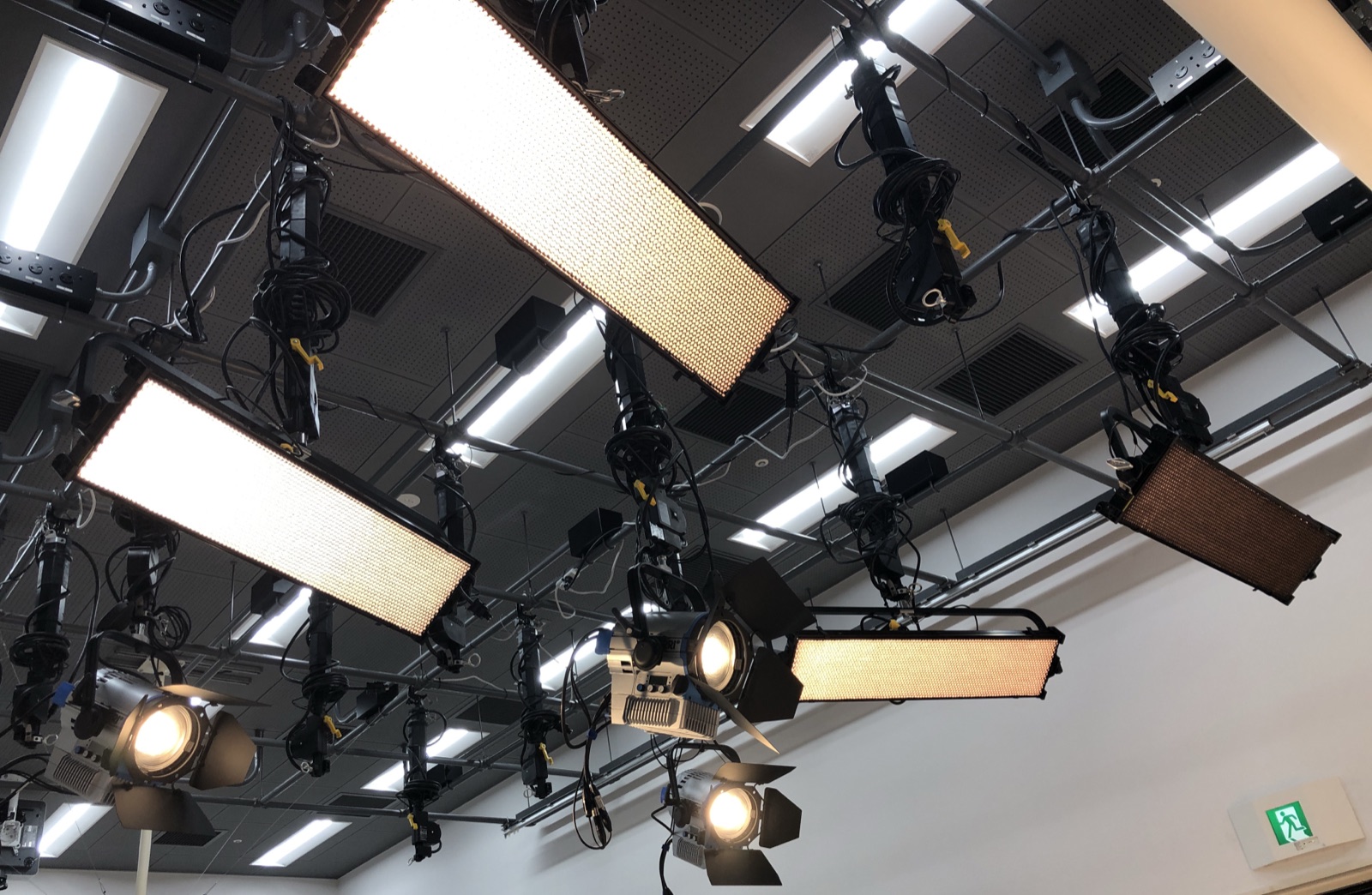
第1章では「PCから天井のライトを操作できる」と紹介しました。この章では、その間にどんな機材が挟まっていて、信号がどう流れているのかを確認します。
Chapter 1 introduced the idea that "you can control the ceiling lights from a PC." This chapter looks at what equipment sits in between and how the signal flows.
途中の仕組みを知っておくと、「ライトが反応しない」というトラブルのとき、どこを疑えばいいか が判断できます。
Knowing the chain in between lets you judge where to look first when "the lights won't respond."
2.1 機材一覧|Equipment list
このスタジオに設置されている機材は次の通りです。
The equipment installed in this studio is as follows.
| # | 機材 / Equipment | 数量 / Qty | 場所 / Location |
|---|---|---|---|
| 1 | コントロール用PC / Control PC | 1 | 操作机 / Operator desk |
| 2 | Wi-Fiルーター / Wi-Fi router | 1 | スタジオ内 / In the studio |
| 3 | ENTTEC ODE Mk2(DMXインターフェース / DMX interface) | 1 | ルーター近辺 / Near the router |
| 4 | Kino Flo Diva-Lite 31 LED DMX(フラッド / floodlight) | 4 | 天井 / Ceiling |
| 5 | ARRI L7-C Plus(LEDフレネル / Fresnel spot) | 3 | 天井 / Ceiling |
| 6 | DMXケーブル(5ピンXLR)/ DMX cable (5-pin XLR) | 複数 / several | 天井配線 / Ceiling wiring |
| 7 | LANケーブル / LAN cable | 1 | ルーター⇔ODE / Router ⇔ ODE |
2.2 天井レイアウト(上から見た図)|Ceiling layout (top view)
7台の照明は天井に次のように配置されています。横長・縦長のパネルが Kino Flo Diva-Lite 31(4台)、丸いスポットが ARRI L7-C Plus(3台) です。
The seven fixtures are arranged on the ceiling as below. The rectangular panels are the Kino Flo Diva-Lite 31 (×4); the round spots are the ARRI L7-C Plus (×3).
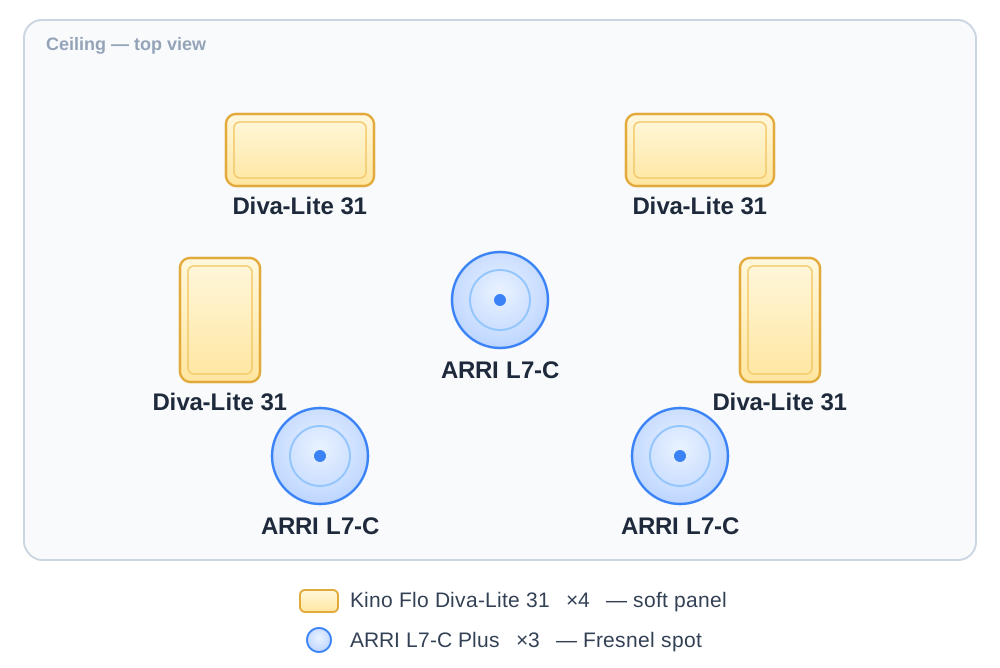
天井を見上げたときの配置イメージ。中央と下側のスポット3台で被写体を立体的に照らし、4台のパネルで全体を柔らかく回す構成です。 / A top view of the layout: the three spots light the subject with dimensionality, while the four panels wrap the scene in soft light.
2.3 信号の流れ(全体図)|Signal flow
PCで操作してから、実際にライトの色が変わるまで、信号は次の経路をたどります。
From operating the PC to a light actually changing colour, the signal follows this path.
[ PC (QLC+ software) ]
        │
        │  Art-Net packet
        │  (over Wi-Fi)
        ↓
[ Wi-Fi router ]
        │
        │  Art-Net packet
        │  (over LAN cable)
        ↓
[ ENTTEC ODE Mk2 ]
        │
        │  DMX signal
        │  (over 5-pin XLR)
        ↓
[ 7 ceiling LED fixtures ]
        ↓
[ Light hits the subject ]
2.4 PC(QLC+)|The PC
操作机の上のPCで QLC+ を起動します。フェーダー(スライダー)やカラーピッカーを操作すると、「○番のライトを明るさ80%・色温度5600Kで」といった命令が作られ、Art-Net(アートネット) という形式に変換されてWi-Fi経由で送られます。
On the operator-desk PC you launch QLC+. Operating the faders and colour picker produces a command like "fixture N at 80 %, 5600 K," which is converted to Art-Net and sent over Wi-Fi.
Art-Netとは: DMXの命令を、インターネットと同じ仕組み(イーサネット)で送るための規格。普通のネットワーク機器(ルーター・LANケーブル)が使えるのが利点です。
Art-Net: a way to carry DMX commands over ordinary Ethernet, so standard network gear (routers, LAN cables) can be used.
2.5 Wi-Fiルーター|The Wi-Fi router
スタジオのWi-Fiルーターは、PCとODE Mk2の間を中継する だけの役割です。
The studio's Wi-Fi router only relays between the PC and the ODE Mk2.
- PCはWi-Fi、ODE Mk2はLANケーブルでルーターに接続 / PC over Wi-Fi, ODE over LAN
- 同じネットワーク上なので信号が届く / Same network, so the signal gets through
⚠️ 注意: このルーターはインターネット用ではなく、照明制御専用 です。PCのWi-Fi設定で必ずこのルーターのSSIDを選んでください(詳細は第4章)。
⚠️ Note: this router is not for internet — it is dedicated to lighting control. Always select its SSID in the PC’s Wi-Fi settings (see Chapter 4).
2.6 ENTTEC ODE Mk2
片側にLANポート、もう片側にDMXコネクタ(XLR)が付いた小さな黒い箱です。役割はシンプルで、Art-Netの命令をDMX信号に変換 して天井の照明に送り出す「翻訳機」です。
A small black box with a LAN port on one side and a DMX (XLR) connector on the other. It simply converts Art-Net commands into DMX signals — a "translator" — and sends them to the ceiling fixtures.
| 入力側 / Input | 出力側 / Output |
|---|---|
| LANケーブル (Art-Net) | XLRケーブル (DMX) |
電源LEDとデータLEDで信号が来ているか目視できます。トラブル時はここを見ると状況がわかります(→第5章)。
Power and data LEDs let you see whether a signal is arriving — useful when troubleshooting (see Chapter 5).
2.7 天井のLED照明|Ceiling fixtures
DMX信号は、ODE Mk2から1本のXLRケーブルで、最初の照明 → 次の照明 → … と 数珠つなぎ(デイジーチェーン) で配線されています。
From the ODE Mk2, the DMX signal is daisy-chained through one XLR cable — first fixture, next fixture, and so on.
[ODE Mk2]
    ↓
[Diva-Lite #1] → [Diva-Lite #2] → [Diva-Lite #3] → [Diva-Lite #4]
    ↓
[ARRI L7-C #1] → [ARRI L7-C #2] → [ARRI L7-C #3]
各照明には 「DMXアドレス」 という固有の番号が割り当てられ、「3番のライトを操作」という命令が来ると3番だけが反応します。この設定は済んでおり、利用者が触る必要はありません。
Each fixture has a unique "DMX address," so a command for fixture 3 moves only fixture 3. This is already configured; users don't need to touch it.
2.8 DMXアドレスとは(補足)|About DMX addresses
DMXは1本のケーブルで 最大512個の数値 を同時に送れる仕組みで、各照明がこの512枠の一部を「ここからここまで使う」と予約しています。
DMX carries up to 512 values over one cable; each fixture reserves a slice of those 512 slots.
| 照明 / Fixture | 使用アドレス / Addresses | ch |
|---|---|---|
| Diva-Lite #1 | 1–31 | 31 |
| Diva-Lite #2 | 32–62 | 31 |
| Diva-Lite #3 | 63–93 | 31 |
| Diva-Lite #4 | 94–124 | 31 |
| ARRI L7-C #1 | 125–132 | 8 |
| ARRI L7-C #2 | 133–140 | 8 |
| ARRI L7-C #3 | 141–148 | 8 |
(実際の割り当ては別途配布する設定資料を参照してください。)
(For the actual assignments, see the separately distributed configuration materials.)
2.9 信号がどこかで止まると…|If the signal stops
この流れのどこか1ヶ所でも切れると、ライトは反応しません。
If the chain breaks at even one point, the lights won't respond.
| 切れた場所 / Break point | 症状 / Symptom |
|---|---|
| QLC+ が起動していない / QLC+ not running | 全ライト無反応 / all dead |
| PCがWi-Fi未接続 / PC off Wi-Fi | 全ライト無反応 / all dead |
| ルーター電源オフ / router off | 全ライト無反応 / all dead |
| ODE Mk2電源オフ / ODE off | 全ライト無反応 / all dead |
| DMXケーブルが抜けた / DMX cable unplugged | その先だけ無反応 / downstream dead |
| ライトの電源オフ / light off | そのライトだけ / that light only |
第5章のトラブルシュートで、これを順番にチェックする手順を紹介します。
Chapter 5's troubleshooting walks through checking these in order.
2.10 まとめ|Summary
- 信号は PC → Wi-Fi → ODE Mk2 → DMX → 照明 の順で流れる / Signal flows PC → Wi-Fi → ODE Mk2 → DMX → fixtures
- ODE Mk2はArt-NetをDMXに変換する「翻訳機」/ The ODE Mk2 translates Art-Net to DMX
- 各照明に固有のDMXアドレス / Each fixture has a unique DMX address
- どこかで切れると、その先は無反応 / A break leaves everything downstream dead