2. System Overview & Signal Flow
Updated: 2026-06*
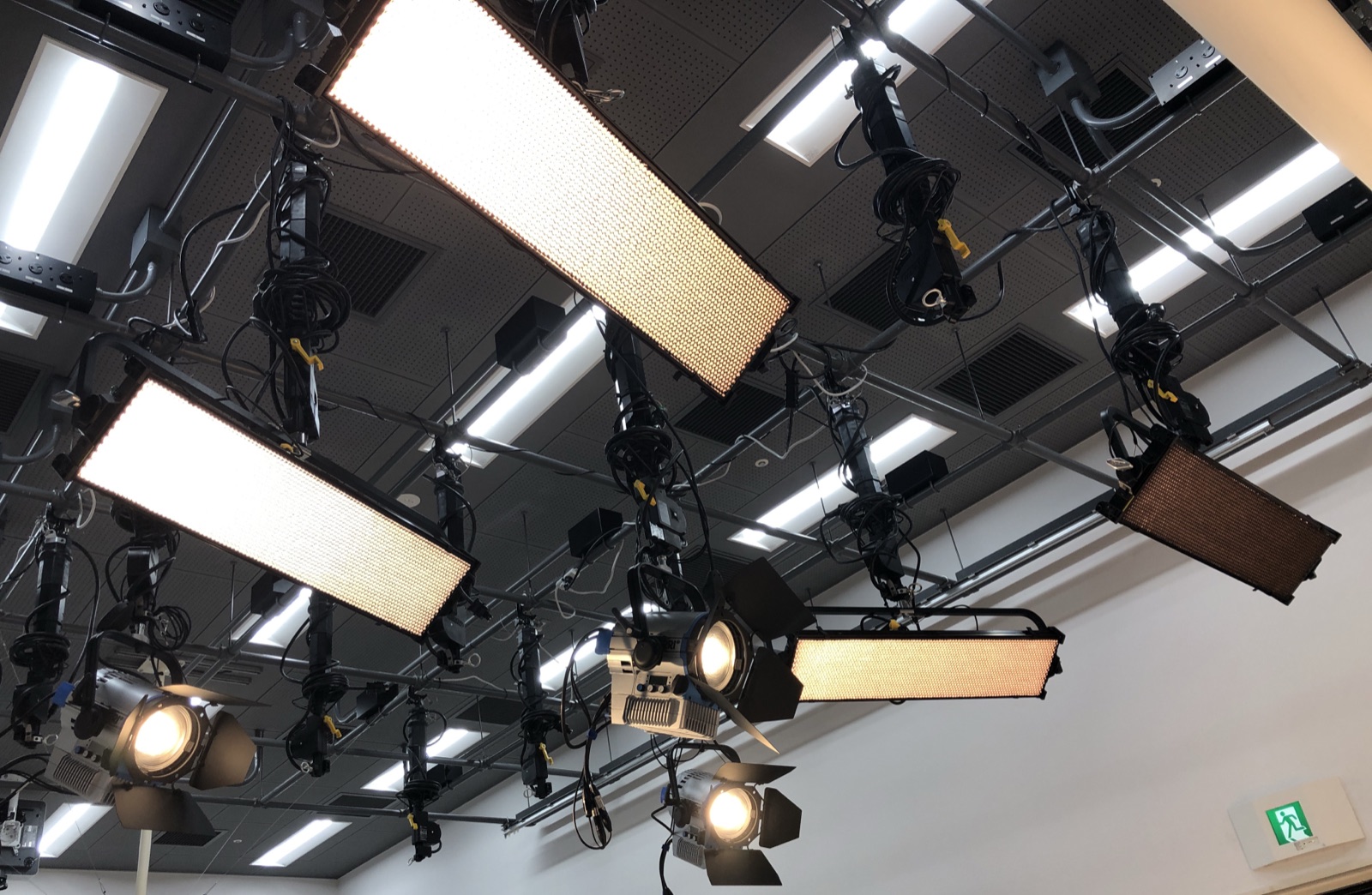
In Chapter 1 we introduced the idea that “you can control the ceiling lights from a PC.” This chapter looks at what equipment sits in between, and how the signal flows.
Knowing the mechanism in between means that when “the lights won’t respond” trouble happens, you can judge where to look first.
Equipment list
The equipment installed in this studio is as follows.
| # | Equipment | Qty | Location |
|---|---|---|---|
| 1 | Control PC | 1 | In the studio, at the operator desk |
| 2 | Wi-Fi router | 1 | In the studio (wall-mounted or on the desk) |
| 3 | ENTTEC ODE Mk2 (DMX interface) | 1 | Near the router |
| 4 | Kino Flo Diva-Lite 31 LED DMX (floodlight) | 4 | Ceiling |
| 5 | ARRI L7-C Plus (LED Fresnel spot) | 3 | Ceiling |
| 6 | DMX cable (5-pin XLR) | several | Ceiling wiring |
| 7 | LAN cable | 1 | Router ⇔ ODE Mk2 |
Ceiling layout (top view)
The seven fixtures are arranged on the ceiling as shown below. The rectangular panels (horizontal and vertical) are the Kino Flo Diva-Lite 31 (×4), and the round spots are the ARRI L7-C Plus (×3).
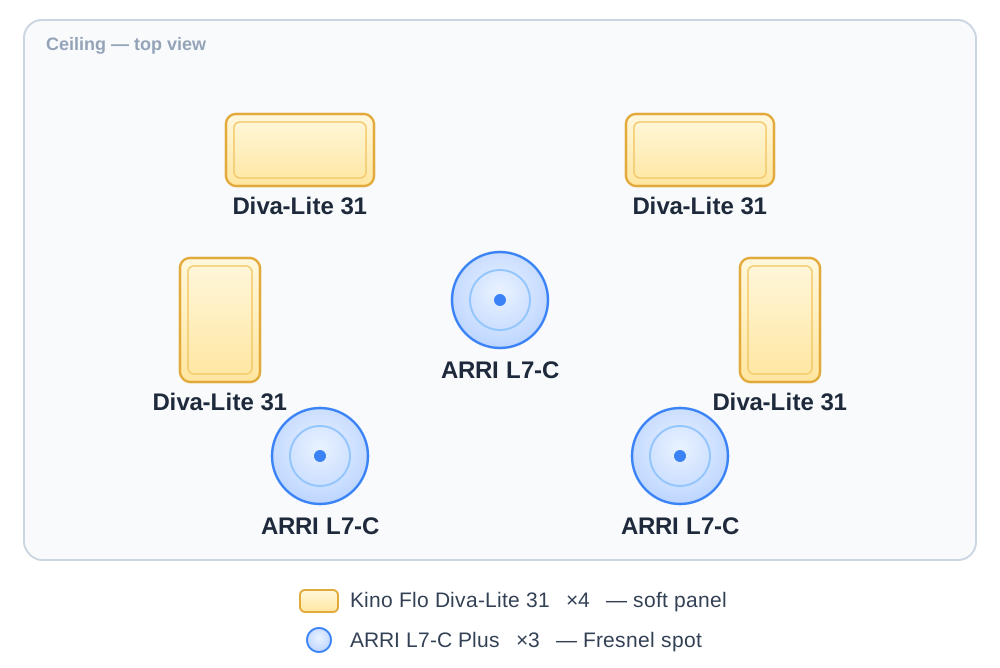
A top-view sense of the layout. The three spots — center and two lower — light the subject with dimensionality, while the four panels wrap the whole scene in soft light.
Signal flow (overall diagram)
From the moment you operate the PC to the moment a light actually changes color, the signal follows this path.
[ PC (QLC+ software) ]
        │
        │  Art-Net packet
        │  (sent over Wi-Fi)
        ↓
[ Wi-Fi router ]
        │
        │  Art-Net packet
        │  (sent over LAN cable)
        ↓
[ ENTTEC ODE Mk2 ]
        │
        │  DMX signal
        │  (sent over 5-pin XLR cable)
        ↓
[ 7 ceiling LED fixtures ]
        ↓
[ Light hits the subject ]
Let’s look at what happens at each step, in order.
① PC (QLC+)
On the PC at the operator desk, you launch the software called QLC+.
When you operate the on-screen faders (sliders) and color picker, QLC+ produces a command like “light fixture #N at 80% brightness and 5600K color temperature.”
That command is converted into a format called Art-Net and sent out over Wi-Fi.
What is Art-Net: a standard for sending DMX commands over the same mechanism as the internet (Ethernet). The advantage is that ordinary network gear (routers, LAN cables) can be used.
② Wi-Fi router
The Wi-Fi router in the studio serves only to relay between the PC and the ODE Mk2.
- The PC connects to the router over Wi-Fi
- The ODE Mk2 connects to the router with a LAN cable
- Because they’re on the same network, the signal gets through
⚠️ Note: This router is not for internet access. It is dedicated to the studio’s lighting control. In the PC’s Wi-Fi settings, always select this router’s SSID. This is covered in Chapter 4.
③ ENTTEC ODE Mk2
A small black box with a LAN port on one side and a DMX connector (XLR) on the other.
Its role is simple: it converts Art-Net commands into DMX signals and sends them out to the ceiling fixtures. Think of it as a “translator.”
| Input side | Output side |
|---|---|
| LAN cable (Art-Net) | XLR cable (DMX) |
The ODE Mk2 has a power LED and a data LED, so you can visually check whether a signal is arriving. When troubleshooting, looking here tells you a lot (see Chapter 5).
④ Ceiling LED fixtures
From the ODE Mk2, the DMX signal is wired through a single XLR cable in a daisy chain — first fixture → next fixture → and so on.
[ODE Mk2]
    ↓
[Diva-Lite #1] → [Diva-Lite #2] → [Diva-Lite #3] → [Diva-Lite #4]
    ↓
[ARRI L7-C #1] → [ARRI L7-C #2] → [ARRI L7-C #3]
Each fixture is assigned a unique number called a “DMX address.” When the command “operate fixture #3” arrives, only fixture #3 responds.
This address setup is already done; users don’t need to touch it.
What is a DMX address (supplement)
DMX is a mechanism that can send up to 512 values at once over a single cable. Each fixture reserves a slice of those 512 slots — “I use from here to here.”
For example:
| Fixture | Addresses used | Channels |
|---|---|---|
| Diva-Lite #1 | 1–31 | 31ch |
| Diva-Lite #2 | 32–62 | 31ch |
| Diva-Lite #3 | 63–93 | 31ch |
| Diva-Lite #4 | 94–124 | 31ch |
| ARRI L7-C #1 | 125–132 | 8ch |
| ARRI L7-C #2 | 133–140 | 8ch |
| ARRI L7-C #3 | 141–148 | 8ch |
(For the actual assignments, refer to the separately distributed configuration materials.)
Each fixture looks only at its own address range and receives the values it needs. That is the basic rule of DMX.
If the signal stops anywhere…
If the flow is broken at even one point, the lights won’t respond.
| Where it’s broken | Symptom |
|---|---|
| QLC+ on the PC isn’t running | All lights unresponsive |
| The PC isn’t connected to Wi-Fi | All lights unresponsive |
| The router’s power is off | All lights unresponsive |
| The ODE Mk2’s power is off | All lights unresponsive |
| A DMX cable is unplugged | Only the lights downstream of it are unresponsive |
| A light’s power is off | Only that light is unresponsive |
Chapter 5’s troubleshooting introduces a procedure for checking these in order.
Summary
- The signal flows in the order PC → Wi-Fi → ODE Mk2 → DMX → fixtures
- The ODE Mk2 is the “translator” that converts Art-Net to DMX
- Each fixture is assigned a unique DMX address
- If it’s broken anywhere, everything downstream goes unresponsive