1. はじめに|Introduction
Updated: 2026-06*
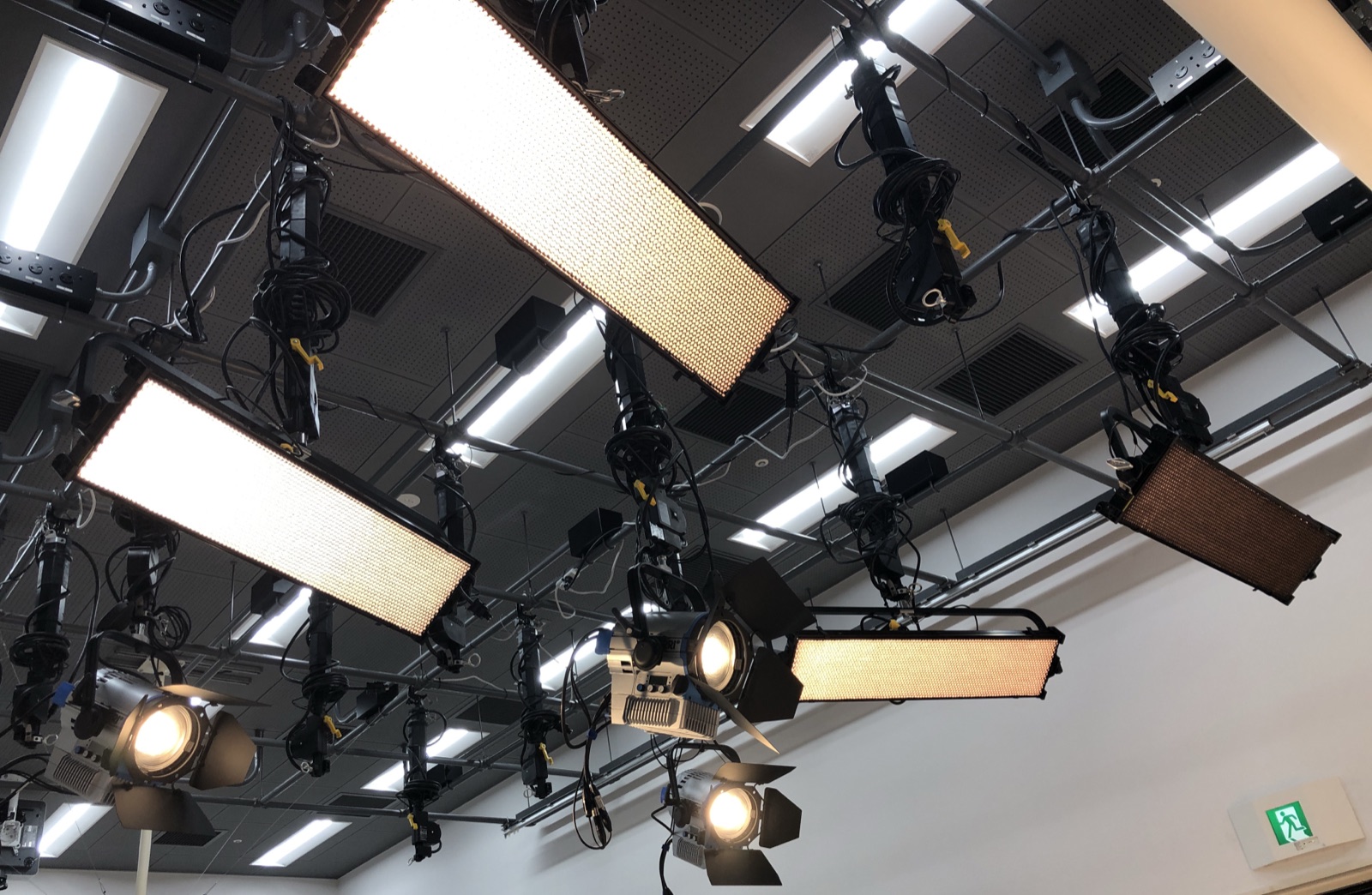
撮影スタジオの天井を見上げると、いくつかのLED照明が吊られています。これらは天井からスタジオの中央を照らすために配置されていて、1台ずつスイッチで点ける器具ではありません。離れた場所にあるPCから、すべての明るさ・色を一括で操作する仕組みになっています。
Look up at the studio ceiling and you'll see several LED fixtures. They light the centre of the studio from above and are not switched on one at a time — their brightness and colour are all controlled together from a PC off to the side.
この連載では、その仕組み — DMX(ディーエムエックス)と QLC+(キューエルシープラス) — を、はじめての人にもわかるように解説していきます。
This series explains how that works — DMX and QLC+ — in a way that makes sense even on your first time.
1.1 このスタジオでできること|What you can do
天井のLED照明は、いずれも 明るさ・色温度・色 を自由にコントロールできるタイプです。具体的には、こんなことができます。
Every ceiling LED here lets you freely control brightness, colour temperature, and colour. Concretely, you can:
- 昼光色の白から夕焼けのオレンジまで 色温度を連続的に変える / Vary colour temperature continuously, daylight white to sunset orange
- 赤・緑・青 を混ぜて自由な色を作る(背景を青く、人物だけ暖色に、など)/ Mix red, green, blue for any colour
- 明るさを 0% から 100% まで 滑らかに調整 / Adjust brightness smoothly, 0–100 %
- 複数のライトを 同時に・別々に 操作 / Control lights together or separately
- 設定を 「シーン」として保存 し、ワンタッチで呼び出す / Save settings as a “scene” and recall in one tap
「人物用の柔らかい光」「商品用の白い光」「背景紫色のドラマチック照明」など、撮影内容に応じて何パターンも切り替えられます。
You can switch between many looks — soft light for people, clean white for products, a dramatic purple background — to suit the shot.
1.2 なぜソフトウェアで操作するのか|Why control from software
天井に吊られた照明には本体にも操作パネルがありますが、撮影中に脚立を持ち出して1台ずつ調整するのは現実的ではありません。
The ceiling fixtures have on-unit panels, but hauling out a stepladder to adjust each one mid-shoot isn't realistic.
そこで、PCの画面上に「仮想のコントロールパネル」を作り、そこから全部のライトを動かす 方法をとります。これを実現するのが、無料のオープンソースソフト QLC+ です。
So instead we build a "virtual control panel" on the PC and drive every light from there. The free, open-source software QLC+ makes this possible.
[ Photographer ]
   ↓ move a fader with the mouse
[ QLC+ on the PC ]
   ↓ send a signal
[ Ceiling LED fixtures ]
   ↓
[ Subject gets brighter / colour changes ]
カメラの横にあるPCで明るさを上げれば、天井のライトが即座に反応する — そんな環境が整っています。
Raise the brightness on the PC beside the camera and the ceiling lights respond instantly — that's the setup we have.
1.3 DMXとは何か|What is DMX
DMXは、舞台照明・スタジオ照明の世界で使われる標準の通信規格 です。「この器具を50%の明るさで青色に」といった命令を、決まった形式でケーブル経由で送ります。
DMX is the standard communication protocol used in stage and studio lighting. Commands like "this fixture at 50 % brightness, in blue" are sent over a cable in a fixed format.
一般家庭の照明はスイッチで「点ける/消す」だけが基本です。DMXの世界では、1台の照明に「明るさ」「赤の量」「緑の量」「青の量」「色温度」…と たくさんの数値を同時に送れます。これがDMXの強みです。
Household lighting is basically just on/off. With DMX you can send many values to a single fixture at once — brightness, red, green, blue, colour temperature — and that is its strength.
このスタジオの照明はすべてDMX対応です。PCから送られた数値が最終的にDMX信号として各ライトに届くことで、繊細な光の調整ができます。
Every fixture here is DMX-compatible, so the values you set on the PC arrive at each light as DMX signals, enabling fine control.
1.4 この連載で学ぶこと|In this series
全5章の構成です。各章は5〜10分で読める分量にしています。
Five chapters, each a 5–10 minute read.
| 章 / Ch. | 内容 / Topic |
|---|---|
| #1 | はじめに(この記事)/ Introduction (this article) |
| #2 | システム全体図と信号の流れ / System overview & signal flow |
| #3 | 照明機材 / Fixtures — Diva-Lite 31 & ARRI L7-C Plus |
| #4 | QLC+ の使い方 / Using QLC+ |
| #5 | 安全運用とトラブルシュート / Safe operation & troubleshooting |
1.5 読み進めるための前提知識|What you need to know
特別な知識は不要です。
No special knowledge is required.
- パソコン(Windows / Mac)の基本操作ができる / Basic PC (Windows / Mac) skills
- スタジオで撮影したことがある、またはこれから始める / You shoot in the studio, or are about to start
電気工事やプログラミングの知識は一切必要ありません。
No knowledge of electrical work or programming is needed.
1.6 注意事項|House rules
このスタジオの照明は、学生が無人で利用する設備 です。次のことを必ず守ってください。
This lighting is equipment used by students unattended, so always observe the following.
- 利用後は 正しい手順でQLC+を終了し、照明を消灯 する(→第4・5章)/ After use, shut down QLC+ properly and turn the lights off (see #4, #5)
- 機材の 配線を勝手に変更しない / Don’t change the wiring
- 設定ファイルを 上書き保存しない / Don’t overwrite-save the config file
詳しい運用ルールは第5章でまとめます。
The full operating rules are summarised in Chapter 5.