Export CHOP vs CHOP Reference
Updated: 2026-06*
1. What This Page Covers
In TouchDesigner, different operator families can’t be wired together directly. To pass numerical values between families, you use parameter linking.
This page covers the two main parameter-linking methods (Export CHOP / CHOP Reference) and when to use which.

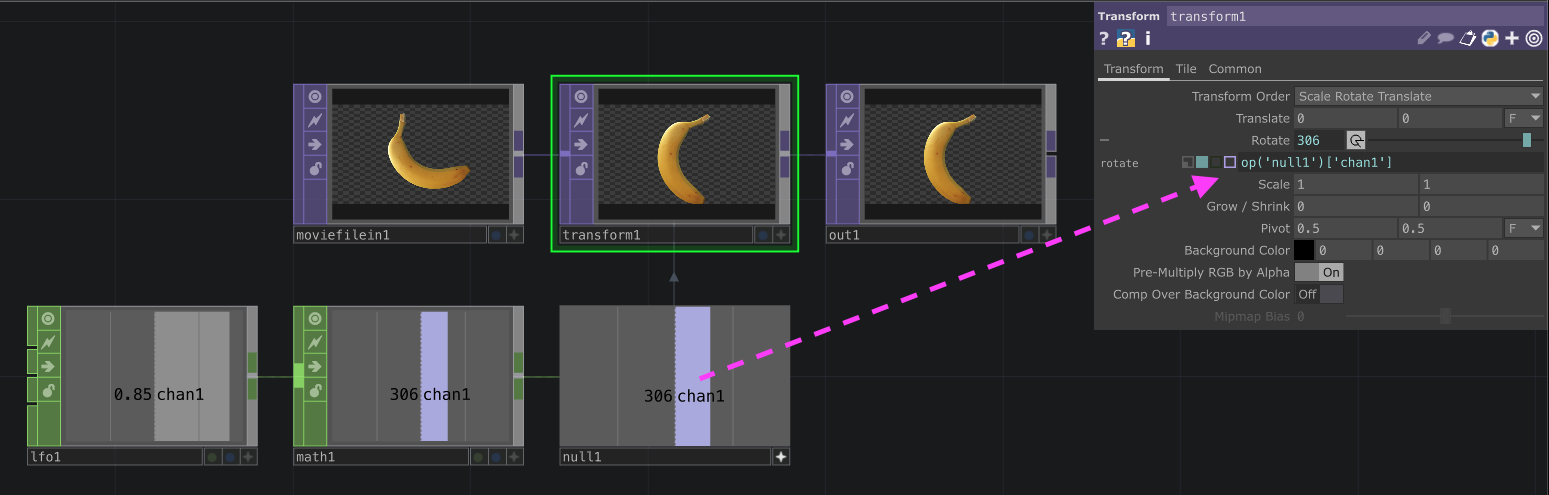
A note on design philosophy: Blender’s Geometry Nodes let one node accept multiple parameter types, but the resulting nodes become more capable and the relationships more complex. TouchDesigner is also used for live performance, so I think the design intentionally keeps nodes simple — to support intuitive thinking and reduce live-operation mistakes. Complex logic goes to Python.
2. Three Parameter-Linking Methods
| Method | Character |
|---|---|
| Export CHOP | Drag-and-drop simple. Beginner-friendly |
| CHOP Reference | Path-based + arithmetic supported. More general |
| Current CHOP Value | Snapshot of the value at link time |
Parameter-linking procedures
| Method | Description |
|---|---|
| ① Drop on parameter window | Open the destination parameter window, activate the source CHOP, drop on the destination |
| ② Drop on operator | Activate the source, drop on the destination operator itself (Export CHOP only) |
3. Export CHOP
3.1 Strengths
- Same-project only parameter linking
- Drag-and-drop friendly:
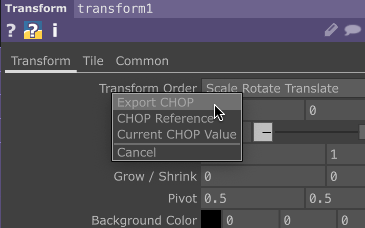
Drop onto a parameter name (also works for CHOP Reference):
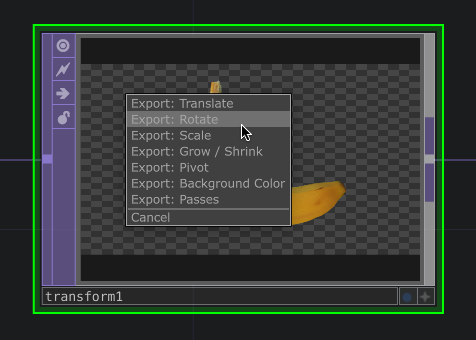
Drop onto the operator itself (Export CHOP only, not CHOP Reference):
3.2 Export Enable button
The Export Enable button (green dot) toggles the parameter on/off:
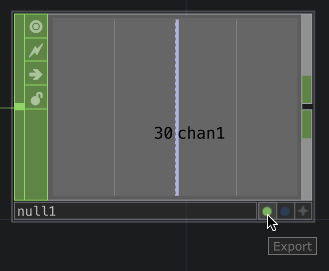
3.3 Removing the link
From the destination, right-click the number box / parameter → Remove Export:
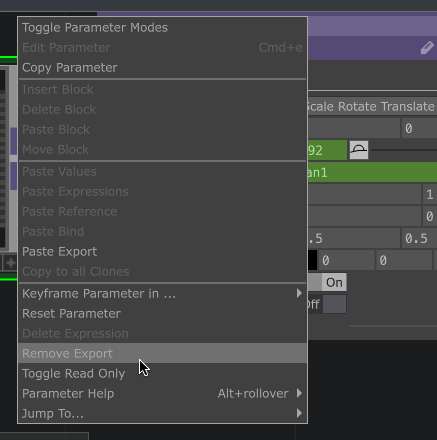
By design, removal takes an explicit action — to prevent accidental disconnection.
4. CHOP Reference
4.1 Path specification (more flexible)
Reference values by relative or absolute path:
| Path type | Example |
|---|---|
| Same Container | op('OperatorName')['ChannelName'] |
| Relative path | op('Container/.../OperatorName')['ChannelName'] (no leading slash) |
| Absolute path | op('/Container/.../OperatorName')['ChannelName'] (with leading slash) |
To pass values between separate
.toefiles,op()references don’t apply — use a networked transport such as OSC / NDI / Touch In and Touch Out CHOPs.
4.2 Arithmetic supported
CHOP Reference can include arithmetic inline:
op('lfo1')['chan1'] * 10 + 5This is the biggest difference vs Export CHOP.
4.3 Removing the link
Open the parameter box and Delete, or right-click → Delete Expression.
5. Four Parameter-Box Types
Click + to expand a parameter — you can switch between 4 types:
| Type | Color | Content |
|---|---|---|
| Constant | Gray | Literal value |
| Expression | Light blue | CHOP Reference |
| Export | Green | Export CHOP |
| Bind | Purple | Bidirectional link. A Bind Master and its Bind References always stay in sync (commonly used with a Container’s Custom Parameters) |

6. When to Use Which
Personal take:
| Scenario | Recommended |
|---|---|
| Simple project | Export CHOP (better ergonomics, beginner-friendly) |
| Project spanning multiple Containers | CHOP Reference (path flexibility) |
| Need arithmetic | CHOP Reference (required) |
| Live performance with fast toggling | Export CHOP (green-dot toggle is intuitive) |
For anyone comfortable with code-based programming, CHOP Reference as the default is the more versatile choice — since inline arithmetic shows up constantly.
7. Practical Tips
7.1 Type the path directly
CHOP Reference can be typed. Once you know the paths, typing is often faster than drag-and-drop.
7.2 In-Container references
Inside a single Container, paths shorten — easier to copy/paste:
op('lfo1')['chan1']7.3 Debugging
Errors in a CHOP Reference turn the parameter red. Check the path for typos or mismatched operator names.